Elevate Your Brand with the Gym Fitness PowerPoint Template
In a world where attention spans are shrinking and visual communication dominates, the way you present your work can determine whether your message lands or gets lost. Whether you are a fitness entrepreneur pitching a new studio concept, a wellness coach preparing a client workshop, or a gym owner showcasing quarterly results, the tools you use to tell your story matter more than ever. The Gym Fitness PowerPoint Template offers a streamlined, professional foundation for anyone who needs to present ideas with clarity and impact. It is not just a set of slides — it is a visual system designed to help you communicate complex information quickly and memorably.
Why Presentation Design Matters More Than Ever
Over the past few years, the way we consume and share information has shifted dramatically. Remote work, hybrid meetings, and digital-first collaboration have made slide decks a central part of daily communication. But with so many presentations flooding inboxes and screens, standing out requires more than just good content. It requires thoughtful design. Audiences today expect clarity, visual hierarchy, and a clean aesthetic. They respond to presentations that feel intentional rather than thrown together. The Gym Fitness PowerPoint Template addresses this shift head-on by offering a contemporary, simple, yet powerful design system that works across devices and platforms. Whether you present on a laptop in a boardroom or share slides via Zoom, the 16:9 Full HD ratio ensures your content looks sharp and professional every time.
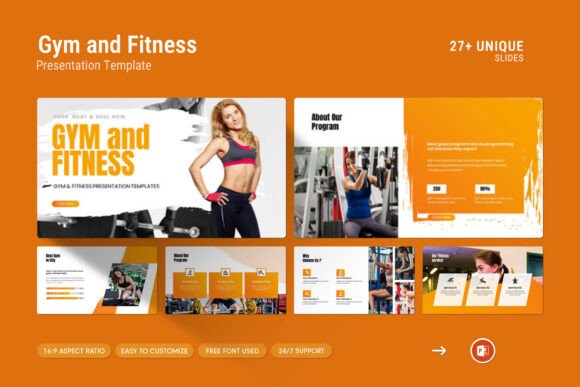
This template is built for versatility. It includes 28 slides in total, each crafted to support different types of content — from infographics and data tables to photo layouts and vector icons. For professionals who need to cover a lot of ground without overwhelming their audience, this variety is a practical advantage. You can present numbers, ideas, team profiles, and company milestones all within a cohesive visual language. That consistency builds trust and makes your message easier to follow.
Designed for Real Workflows
One of the most frustrating parts of creating a presentation is wrestling with formatting. You have the content, but the template fights you every step of the way. The Gym Fitness PowerPoint Template eliminates that friction with features that respect your time and workflow. The master slides layout allows you to apply global changes in seconds, so you never have to manually adjust each slide. Color changes are straightforward, giving you the flexibility to match brand guidelines or personal preferences without starting from scratch. And the drag-and-drop picture feature means you can swap images in and out without distorting layouts or breaking design consistency.
These features may sound technical, but they translate into real-world efficiency. For a busy entrepreneur juggling multiple projects, saving even 15 minutes on slide formatting adds up over a week. For a marketer who needs to produce recurring reports, having a template that updates cleanly reduces stress and improves output quality. The template also works on both Apple and Windows systems, which is essential in today's mixed-device environments. No more compatibility headaches when sharing files between team members or clients.
Visual Storytelling for Fitness and Beyond
While the name suggests a fitness focus, the design principles behind this template apply to a much wider range of uses. The clean lines, photo-centric layouts, and icon libraries make it suitable for any business or creator who values modern aesthetics. Think of it as a gym fitness presentation template in concept, but a visual toolkit in practice. The infographics and diagrams allow you to break down processes, compare metrics, or explain workflows without relying on dense text. The vector icons add visual cues that guide the viewer's eye and reinforce key points. And the tables let you present data in a structured, digestible format.
For example, a health coach preparing a client onboarding deck can use the photo layouts to introduce team members, the icons to illustrate service categories, and the diagrams to show progress tracking. A fitness brand launching a new product line can use the template to present market research, pricing structures, and campaign timelines — all within a consistent visual framework. The template adapts to your content, not the other way around.
Practical Implications for Professionals and Creators
When you choose a template like this, you are not just buying slides. You are investing in a system that supports your communication goals. The free font used in the template keeps your presentation accessible and easy to modify, while the included help file and PDF support ensure you have guidance when you need it. The template also comes with access to real support from the designer — a rare but valuable resource if you run into questions or need custom adjustments.
For freelancers and consultants, having a polished template on hand means you can respond to opportunities faster. When a potential client asks for a capability statement or a project proposal, you are not scrambling to design from scratch. You pull up the template, drop in your content, and present a professional document that reflects your standards. For educators and trainers, the template provides a structured way to organize lessons, workshops, or course materials without spending hours on design. And for business owners, it offers a consistent brand experience across internal and external communications.
Another practical advantage is the full editability of every element. You are never stuck with a layout that does not suit your needs. If you need to move an icon, resize a chart, or change the color palette, you can do so freely. That level of control is especially important for teams that need to adapt a template for different departments or campaigns. A single base design can be customized for sales pitches, investor updates, team meetings, and marketing presentations — all while maintaining a cohesive look.
Evolving Expectations in Presentation Culture
Presentation culture has evolved from static bullet points to dynamic visual storytelling. Audiences now expect a certain level of design sophistication, even from small businesses and solo practitioners. The bar has risen because tools have improved. People have seen well-designed decks from major brands, and that visual standard has become the baseline. Using a template like the Gym Fitness PowerPoint Template helps you meet that expectation without needing a graphic design background.
There is also a growing awareness that presentation design affects credibility. Research consistently shows that well-designed visuals improve comprehension, retention, and trust. A cluttered or inconsistent deck can undermine even the strongest data. Conversely, a clean, professional template signals that you care about the details and respect your audience's time. That perception matters, whether you are pitching a million-dollar deal or presenting a community fitness program.
Making the Most of the Template's Features
To get the most out of this template, start by familiarizing yourself with the master slides. This is where you can set global fonts, colors, and backgrounds. Once that foundation is in place, the rest of your slides will automatically follow the same style, saving you hours of manual work. Next, explore the infographic and diagram slides. These are ideal for presenting processes, timelines, or comparative data. Instead of writing a paragraph about your company's growth, turn it into a visual timeline that tells the story at a glance.
Use the photo layout slides to introduce your team, showcase your facility, or highlight client transformations. Images create emotional connection, and the template's design frames them effectively without overwhelming the text. The icon library adds another layer of visual communication. Icons can represent services, values, or steps in a process, making your slides more intuitive and engaging. Finally, take advantage of the table slides for any data that benefits from structure — pricing, schedules, comparison charts, or metrics.
If you are presenting to a external audience, consider customizing the color scheme to match your brand. The easy color change feature makes this straightforward, even if you are not experienced with design software. A branded presentation reinforces your identity and makes your message more memorable. For internal presentations, you might keep the default palette for simplicity, but the option is there when you need it.
Real Support When You Need It
One of the standout aspects of this template is the real support provided by the designer. In a market where many digital products are sold as-is with no follow-up, having access to a skilled designer who can answer questions or help troubleshoot is genuinely valuable. Whether you need clarification on a feature, help with a specific customization, or advice on how to adapt the template for a unique use case, that support line is there. It reflects a commitment to quality and customer satisfaction that goes beyond the file itself.
For professionals who rely on their presentation tools to perform under pressure, that safety net matters. It means you are not alone if something does not work as expected. And it means the template is backed by someone who understands both the design and the practical challenges of creating effective presentations.
A Template That Works for Your Real Needs
At its core, the Gym Fitness PowerPoint Template is about making your work look professional without forcing you to become a designer. It acknowledges that your time is best spent on content, strategy, and connection — not on aligning boxes or choosing fonts. By providing a clean, modern, and fully editable foundation, it lets you focus on what matters most: communicating your ideas clearly and compellingly.
Whether you are preparing for a client meeting, a team workshop, a conference talk, or an investor pitch, this template gives you a head start. It fits naturally into the way modern professionals work — across devices, with minimal friction, and with room for customization. And because it is built on simple but powerful design principles, it will look just as relevant a year from now as it does today. If you are ready to present your work on another level, this template is a practical and reliable place to start.